A construction CRM with estimating, and it's free.
Track every bid from invite to won or lost, keep each GC and contact with their bids, and price the job in the same project. Free to use, with no credit card and no trial.
Most CRMs are built for sales teams, and construction gets bolted on after. Bidding work doesn't run like a sales funnel. An invite comes in from a GC, you decide whether it's worth chasing, you price it, you send it, and you win or lose.
This is the same CRM and estimating that run inside our full construction platform, estimate included. It isn't a trial, and it isn't a cut-down free edition.
No credit card
Not a trial
Estimating included
Invite your team
Mac and Windows compatible
Import companies from CSV
Track and price a bid in 6 steps
Create your workspace
Pick CRM & Preconstruction and give us your name, email and company. There's no card to enter.
Bring in your companies
On Companies, add your GCs, owners and architects, or click Import CSV to load the list you already have.
Add the bid
On Pipeline, click + New Project. Give it a name, the GC and the bid date, and it shows on the board and the calendar.
Decide go or no-go
On the project's Overview, use the pen on the Go / No-Go card to score the job, then make the call.
Price it
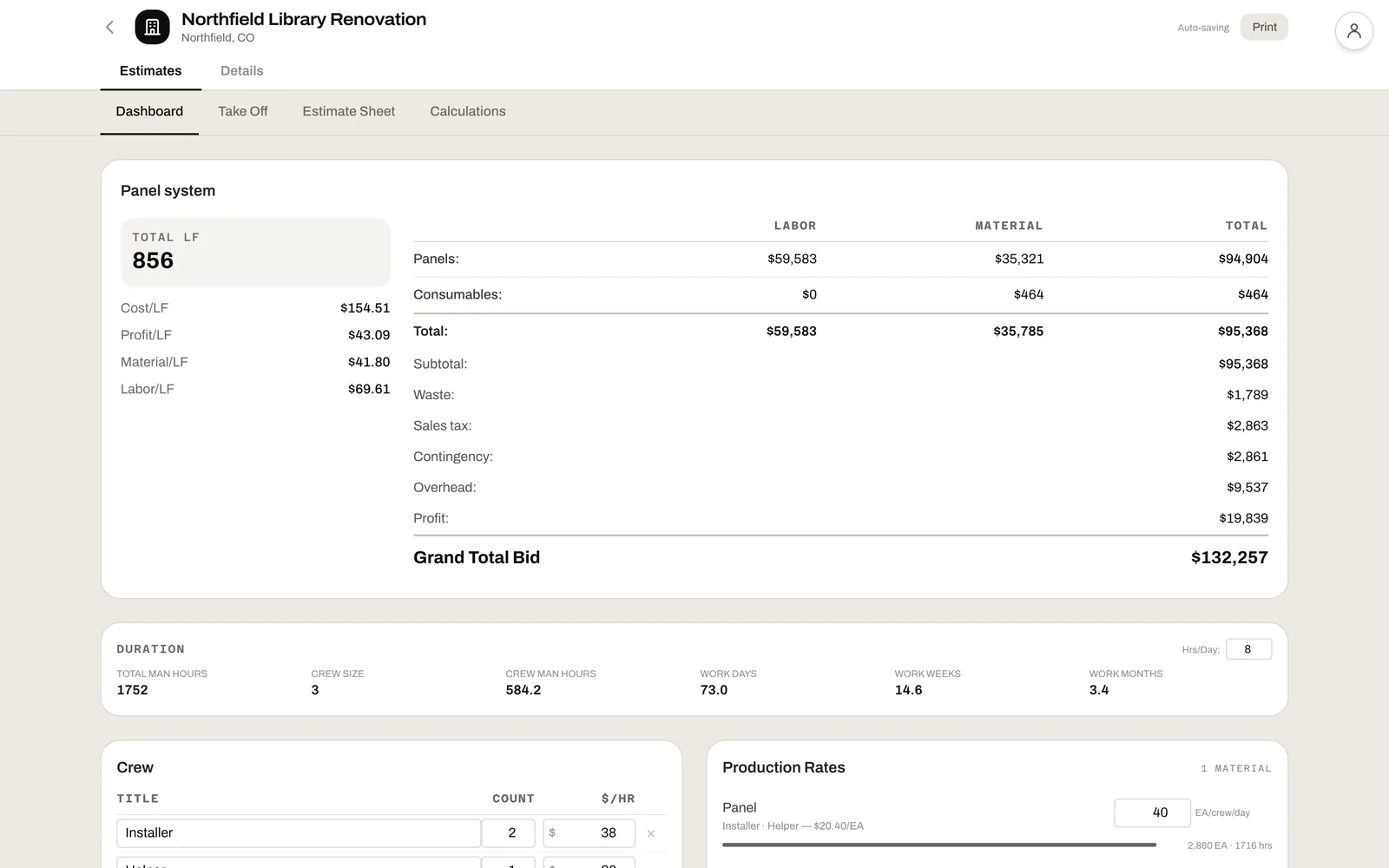
On the Estimate tab, click Add scopes. Enter quantities on Take Off, and the Dashboard totals labor, material and markups into a bid.
Send it, then win or lose
Move the bid to Submitted, then Won or Lost. A lost bid asks why, so your win rate has reasons behind it.
Everything you get in one module.
A pipeline of bids, the people behind them, and the estimate for each one, all opened from the same project.
Pipeline, list or board
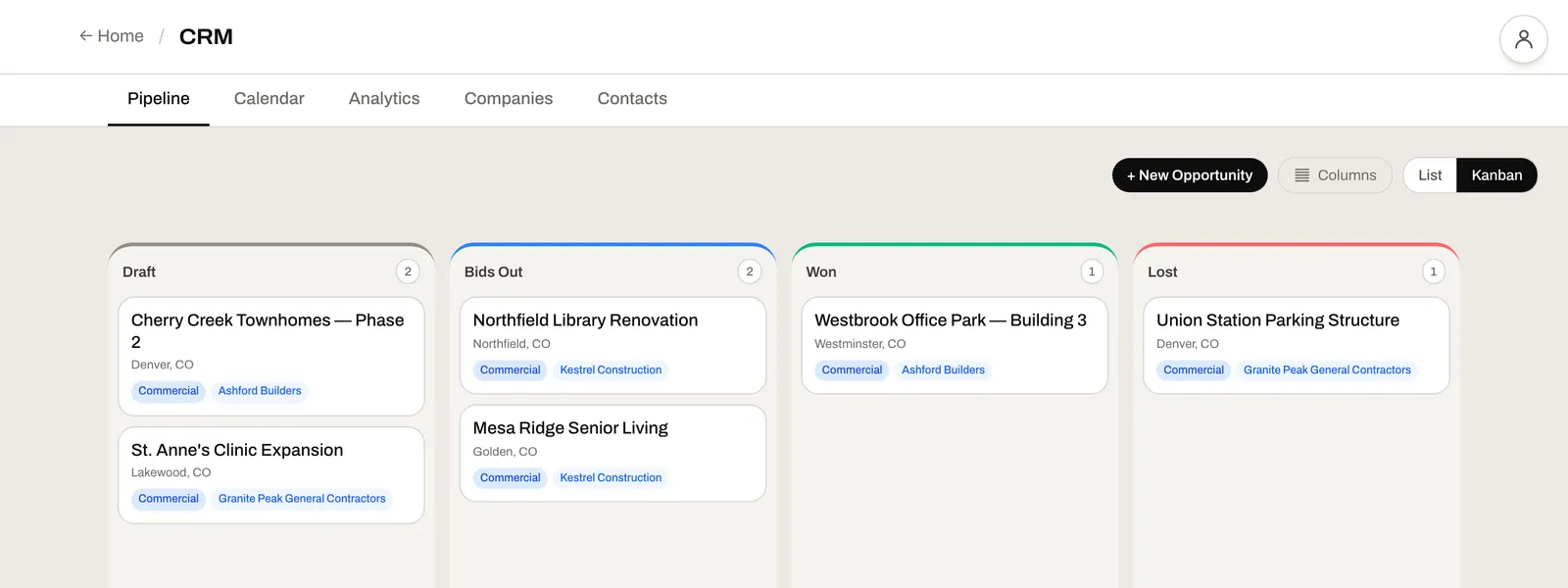
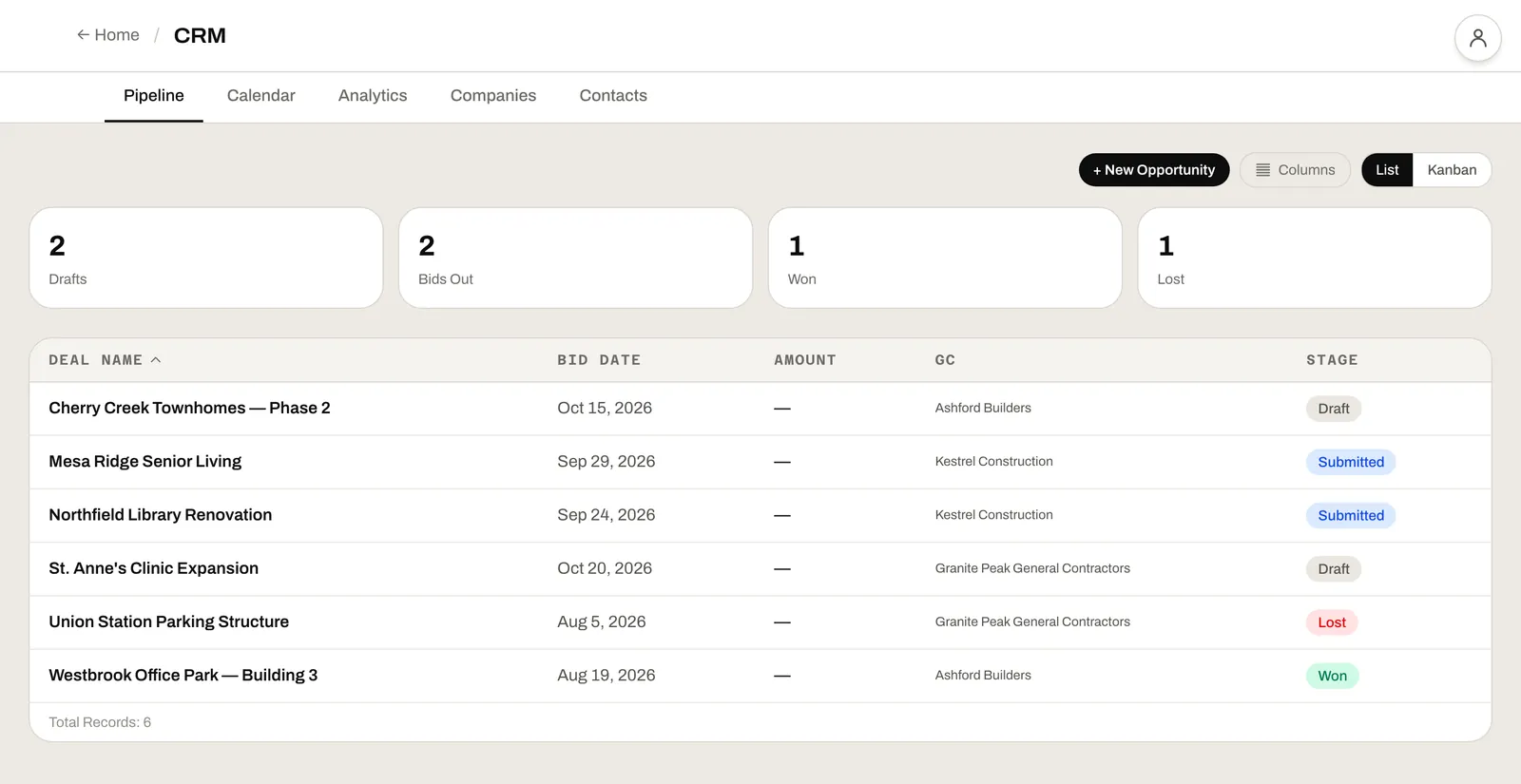
Every bid in Draft, Submitted, Won or Lost. Sort the list by bid date, amount or stage, or drag cards across the board.
Bid calendar
Every bid date on a calendar, so you see what's due this week before it's due today.
Companies and contacts
GCs, owners, architects, engineers and consultants, each with their people, their bids, their files and the history of every call.
Several GCs per bid
Bidding the same job to three GCs? Add each one to the project with its own bid amount and its own result.
Go / No-Go scoring
Score a job on capacity, capability, profitability, relationship, geographic fit and bonding. Weight them, or change the questions for the project.
Win-rate analytics
Win rate and bid value by GC, by estimator, by sector and by project type, with why you lost and who beat you.
Tasks and activity
Log calls, emails, meetings and notes on a company or a bid, and set follow-up tasks so nothing sits in someone's inbox.
Drawings and files
Each project keeps its drawing sets, specs and bid forms under Documents, so the whole bid lives in one place.
Estimates from your own scopes
Set up a scope once with your own columns, materials and formulas, then price every bid from it. One bid can carry several scopes.
Labor and duration
Production rates and your crew turn quantities into labor cost, man-hours and work weeks.
Markups in your order
Add waste, tax, contingency, overhead and profit as your own lines, as a percent or a fixed amount, applied in the order you set.
CSI cost codes built in
Your workspace starts with 173 CSI MasterFormat cost codes, ready to use or change.
A free alternative to HubSpot and BuildingConnected.
Fitting bids into HubSpot?
HubSpot is a good CRM for a sales team. Bidding work isn't a sales funnel.
Bids, not deals.In a general CRM a bid is a "deal", and the bid date, the GC and the go/no-go are fields you build yourself.Here every project already has its GCs, bid date, stage and go/no-go.
The estimate is in the project.A general CRM stops at the contact, and the price lives in a spreadsheet somewhere else.Open the project's Estimate tab and price it there.
Your whole team.HubSpot's free CRM is for up to 2 users, and Starter lists at $20 per seat a month.Invite the people who bid with you, free.
Need more than a bid board?
BuildingConnected is where a lot of invites arrive. It isn't where you decide on them or price them.
Keep every GC, not just the invite.A bid board tracks the invites that come through it.Here every company, contact, call and file stays with the bids you made to them, wherever the invite came from.
Know your win rate.A count of invites doesn't tell you which GCs you win with.Analytics shows your win rate by GC, estimator, sector and project type, and why you lost.
A price you can see.Bid Board Pro is quote only on Autodesk's pricing page.Ours is free to use.
A closer look at what you get.
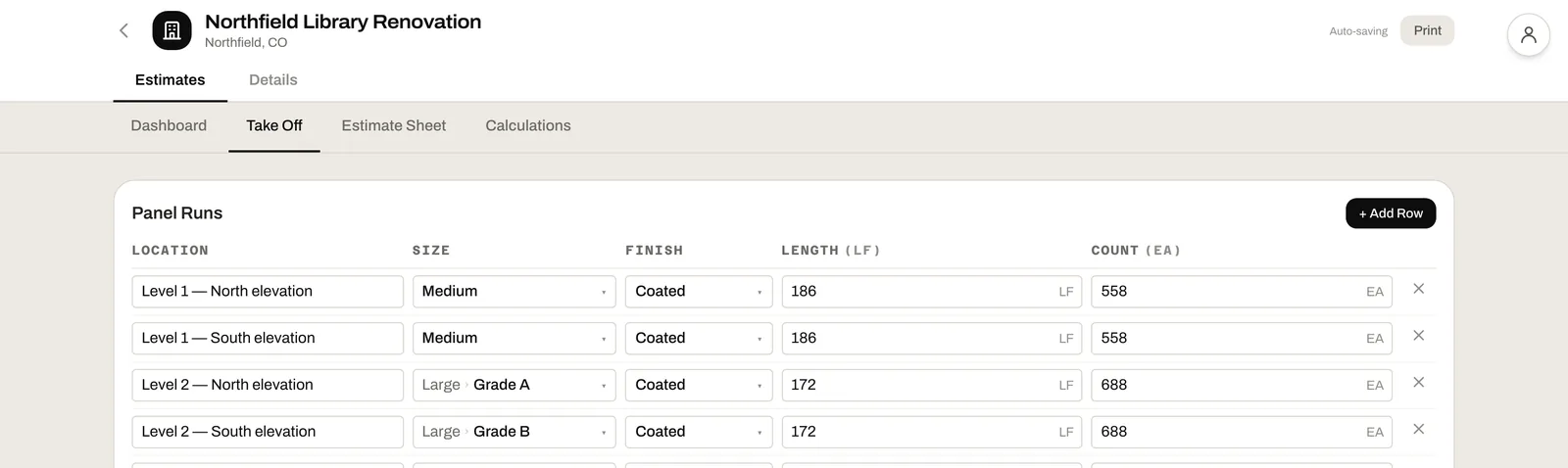
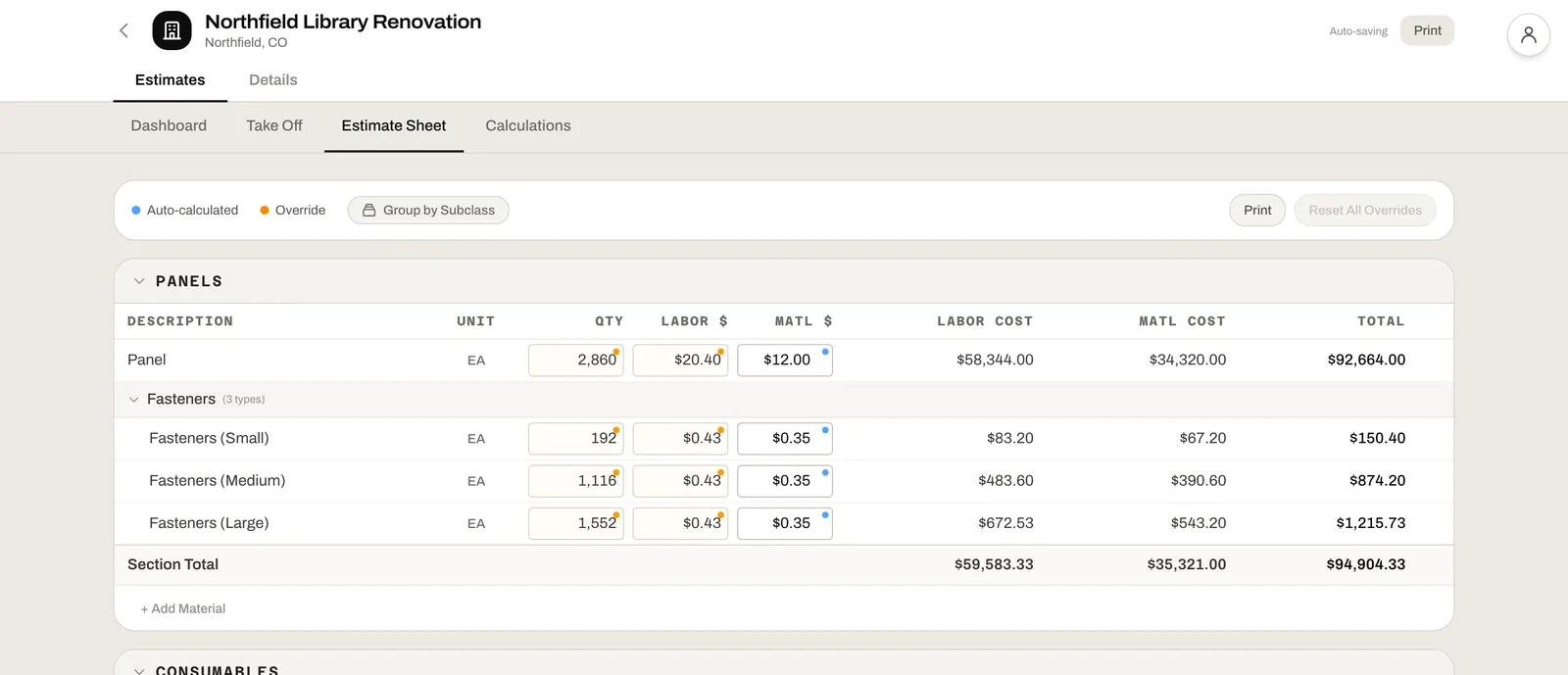
Bid board Every bid by stage, with its GC on the card. Drag a card to move it.Pipeline list The same bids as a list, sorted by bid date, amount or stage.Take Off Enter quantities by location, in the columns your scope defines.Estimate Sheet Every line priced, with worked-out numbers and your overrides marked.Dashboard Labor, material and markups rolled up into the bid, with duration from your crew.
Free CRM and estimating compared.
"Free" means different things on different sites. Here's what each one's own pricing page said when we checked on November 5, 2026.
Starter lists at $20 per seat a month. No estimating
Zoho CRMGeneral CRM
Free, 3 users
Standard is $14 per user a month, billed annually. No estimating
PipedriveGeneral CRM
14-day trial
From $14 per seat a month, billed annually
STACKTakeoff & estimating
Free version
1 active project a month. Paid plans start at $299 per user a month, billed annually
Contractor ForemanConstruction
30-day trial
From $49 a month for 1 user, billed annually
JobTreadConstruction
No trial
From $199 a month with 1 user, plus $20 a month for each user after
BuildingConnectedBid management
Quote only
Bid Board Pro and BuildingConnected Pro have no published price
Who it's built for.
Everyone who works on a bid works from the same project. Who sees the estimate is a permission you set on Team & Access.
Estimators
See what's due on the calendar, price the bid from your own scopes, and keep the drawings, files and notes for the job in one place.
Chief estimators and owners
Score go/no-go before anyone spends a week pricing a job, and check your win rate by GC and estimator in Analytics.
Business development
Keep every GC, owner and architect with their contacts, calls and bids, and follow up with tasks, without needing access to the estimate.
How it fits
The bid is where every job starts.
CRM & Preconstruction works on its own. Each of our other tools is free on its own too, and each one adds to the same projects when you want it.
← From Take-Off
Add Take-Off & Markup and measure the drawings. On Estimate Links, point a take-off item at an estimate line, and the quantity stays current as you remeasure.
→ To Project Management
Add Project Management and award a won bid. The estimate becomes the job's budget, line for line.
→ To the Field
Add the Field App and your crews clock in to the jobs you won, from their phones.
Common questions
Free and accounts
Yes. CRM & Preconstruction is free to use, estimating included, with no credit card and no trial. Each of our tools is free on its own. You only pay if you want all four together: Take-Off & Markup, CRM & Preconstruction, Project Management and the Field App.
Yes. Every project in the pipeline has an Estimate tab. Set up your scopes with your own columns, materials and formulas, enter the quantities, and the estimate works out labor, material, markups and a bid total.
Yes. Invite the people who bid with you from Team & Access. Each person's access is a permission, so business development can work the pipeline and contacts without seeing the estimate.
Yes. On Companies or Contacts, click Import CSV, choose the file and match its columns.
Using the tool
A construction CRM tracks the work you bid: who invited you, when the bid is due, what you priced it at, and whether you won. It keeps the GCs, owners and architects you work with alongside every bid you made to them, so you can see how each relationship is going.
No. Type quantities straight into the estimate's Take Off tab. If you want to measure them from the drawings, add Take-Off & Markup, which is free too, and link each take-off item to an estimate line on Estimate Links.
Yes. Add each GC to the project as a stakeholder, with its own bid amount and result. Analytics counts each one toward that GC's win rate.
Mark it Won and it counts toward your win rate, by GC, estimator, sector and project type. If you add Project Management, you can award the job, and its estimate becomes the job's budget line for line.
You can print the estimate from the Estimate Sheet or the project menu. Excel export and a proposal document built from the estimate aren't available yet.
Not today. Add a bid with + New Project on the Pipeline, with its GC and bid date, and it shows on the board and the calendar.
Comparisons
Start by checking that it isn't a trial and that it isn't a general sales CRM you have to rebuild around bids. Then check whether you can invite your team and price the bid in the same place. Leviathan Built does all of that in your browser, with no card and no trial.
HubSpot is a general CRM, built for sales teams. Its free CRM is for up to 2 users, and Starter lists at $20 per seat a month. Here bids, GCs, bid dates and go/no-go come built in, the estimate is in the same project, and it's free to use.
BuildingConnected is where many bid invites arrive. Bid Board Pro is quote only on Autodesk's pricing page. Leviathan Built keeps every GC and contact with the bids you made to them, prices the bid, and shows your win rate, wherever the invite came from.
Put your next bid in a free CRM.
Bring your GC list and your next bid date. It takes about a minute to get started.