Leviathan Built / Solutions / Estimating
02 Preconstruction · Estimating

Build the bid from your scopes. Your formulas. Your numbers.

Sage Estimating wasn't built for your trade. Excel works until the new hire opens it. We turn the spreadsheets you already trust into a system your whole team can price from — and connect it straight to the bid, the budget, and the books.
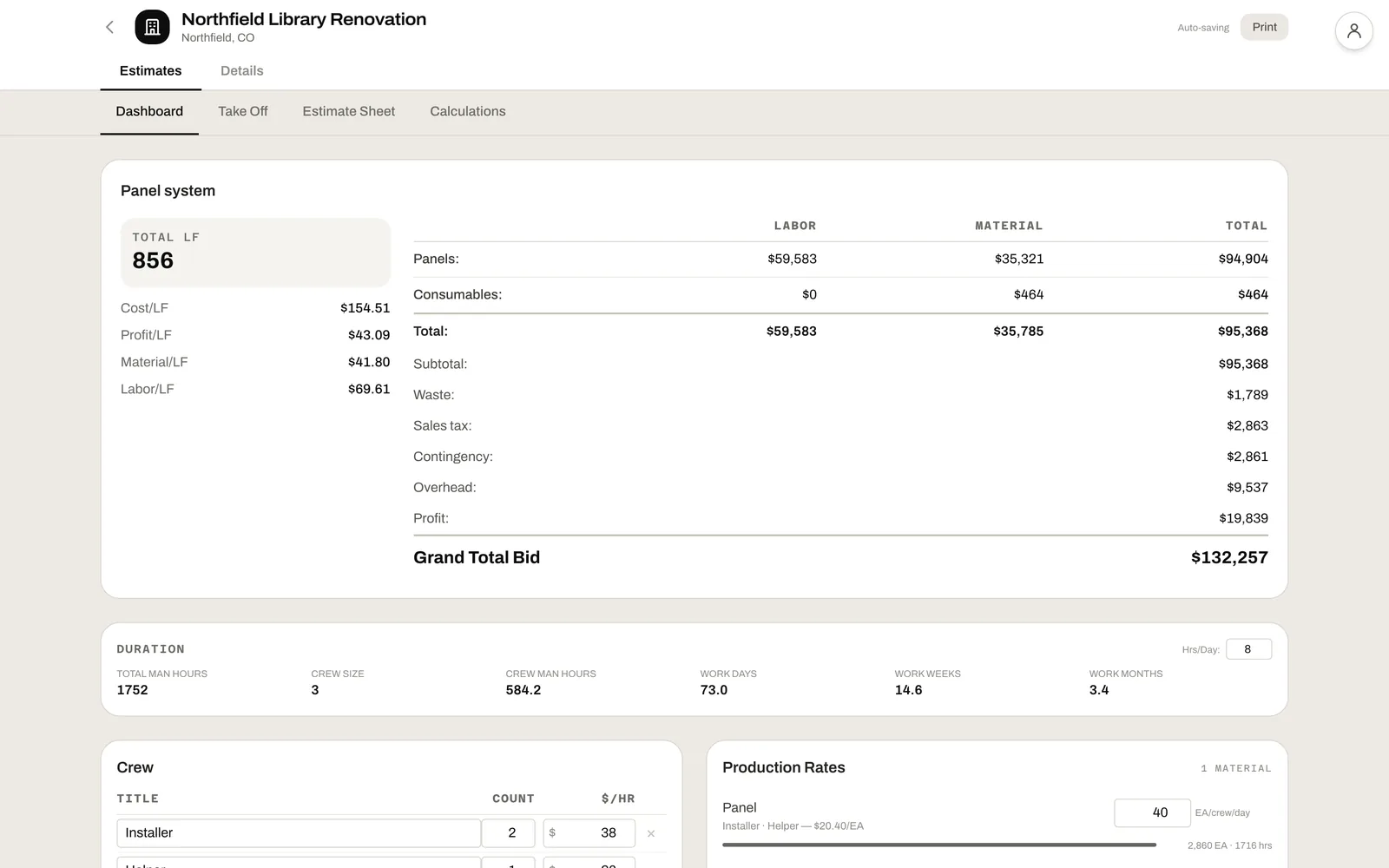
An estimate dashboard: labor and material by section, waste, tax, contingency, overhead and profit to a grand total bid, with cost and profit per linear foot

A spreadsheet estimate is a single point of failure with a deadline attached.

Every formula is a hand-grenade. One mistyped row, one stale rate, one assumption carried over from last year's job — and the margin you thought you had walks out the door. The new hire can't price work without your spreadsheet. The senior estimator can't review work without opening it. The cycle never ends.

We took the estimate out of Excel and put it in a system that knows your scopes, your formulas, and your unit costs — so the math is right by default.

Every line priced the way you price it.

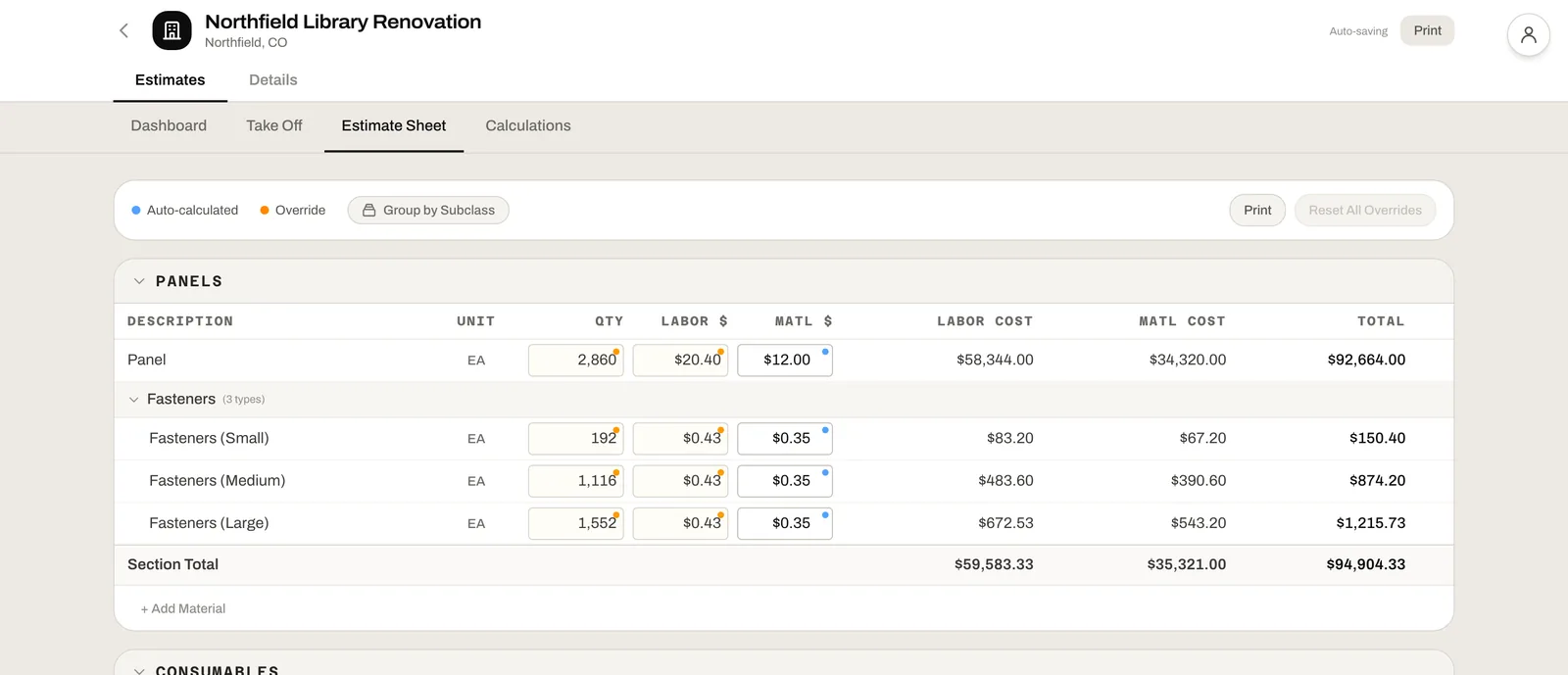
Your scopes, your materials, your formulas. Quantities come from the take-off; fasteners, consumables and waste work themselves out; anything can be overridden — and every line shows whether you typed the number or the sheet worked it out.

  • Worked-out and overridden numbers, marked on every line
  • Materials broken out by size and type on their own
  • Labor from production rates and your crew, not a guess
An estimate sheet: each material with quantity, labor and material rates and totals, fasteners broken out by size, auto-calculated and overridden values marked

Know the margin before you send the number.

Waste, tax, contingency, overhead and profit stack up in the order you set, and the bid reads back as cost and profit per unit — so you can see what the job is worth to you before the GC does. Crew and production rates turn the same quantities into man-hours and work weeks.

  • Markups in your order, on the basis you choose
  • Cost, profit and labor per unit at a glance
  • Duration from the same numbers as the price
The estimate's totals and markups, with duration in man-hours, crew size and work weeks

The estimating workbench, configured to your trade.

Build your scopes once. Bid every job from them. Standardize how your team prices work so the answer doesn't depend on which estimator opened the file.

01

Your spreadsheets, rebuilt as a system

Sage built generic templates for any contractor. Your Excel was built by one estimator at 2 a.m. We rebuild your sheets into scope templates — and every estimator on your team starts pricing the same way.

02

Takeoff-linked quantities

Any quantity column can pull from a measurement on the marked-up plan. Update the takeoff, the estimate updates. No copy-paste between systems.

03

Labor that does the production math

Spreadsheets multiply hours by rate. Sage estimates from production units. We do both — and the production rate updates from last quarter's actual field hours. Your bid stops being a guess about Mike's pace.

04

CSI cost codes built in

Standard cost-code taxonomy out of the box. Roll up by code, by scope, or by phase for the proposal — and for job costing once you win.

05

Math that travels with the bid

Square-foot pricing that updates the labor with it. Complex unit math that doesn't blow up the proposal PDF. Contingency add-ons set once, applied everywhere. Formulas your bookkeeper can decode without opening a cell-reference jungle.

06

Revisions & proposal PDF

Full revision history. Compare bid versions side-by-side. Generate the proposal PDF on-demand when it's ready to go out.

The estimate is the spine of the project.

Every other module branches off the estimate. Win the bid and those line items become your project budget. Run the job and your actuals — labor, materials, change orders — meet the estimate in job costing. The estimate isn't a static document. It's the live baseline for everything that follows.

01Take-Off
02Estimating
03CRM
04Construction Mgmt
05Job Costing
06Field App
← From Take-Off

Measurements arrive as live quantities. Markup, labor rate, and material cost compute against them. The takeoff and the estimate are never out of sync.

→ To Project Budget

The won estimate becomes the scope baseline. PMs see what was promised in the bid vs. what's been billed and installed in real time.

→ To Job Costing

Bid line items become budget targets in job costing. Every actual cost lands against an estimate line for variance analysis.

Who actually uses it.

Role 01

Estimators

Spend less time fighting spreadsheet quirks and more time refining margin. The system handles the math; you make the calls.

Role 02

Senior / Chief Estimators

Roll up multi-scope bids, compare revisions, manage your team's bid pipeline from one screen. Reviews don't require a printer anymore.

Role 03

Owners

Track win rate by scope, by GC, by estimator. Know which work is worth chasing — and which isn't.

Common questions.

Yes. We rebuild your estimating spreadsheets as Leviathan scope templates during onboarding — your formulas, your rates, your materials, your markups. You don't lose your work; you just stop having to baby-sit it.

Yes. Templates are per-scope. A masonry scope and a concrete scope have their own materials, units, and labor formulas — and a single bid can combine multiple scopes.

Yes. Add-alternates can be priced as side templates. Unit prices roll up alongside lump-sum totals so the proposal shows both clearly.

PDF proposals are native. Excel export is available for handoff to GCs or accountants who need the data outside the platform.

The estimate is the budget. Once a bid is awarded, the line items flow into job costing and budget tracking inside the platform automatically — no separate hand-off step.

See it priced on your active bid.

Start a free trial and try it on a live job, or book a 30-minute consultation and we'll walk through a real estimate on a real job — your scopes, your rates, your numbers. You'll see exactly how it lands in the field.