Leviathan Built / Solutions / CRM
03 Preconstruction · CRM

A pipeline built for how subs actually sell work.

BuildingConnected sorts your invites. SmartBid forwards them. Neither one tells you whether you should bid the job, what your win rate is at that GC, or what you owe the architect on Friday. We do — and the won bid lands as your next project, not as another spreadsheet to start over.
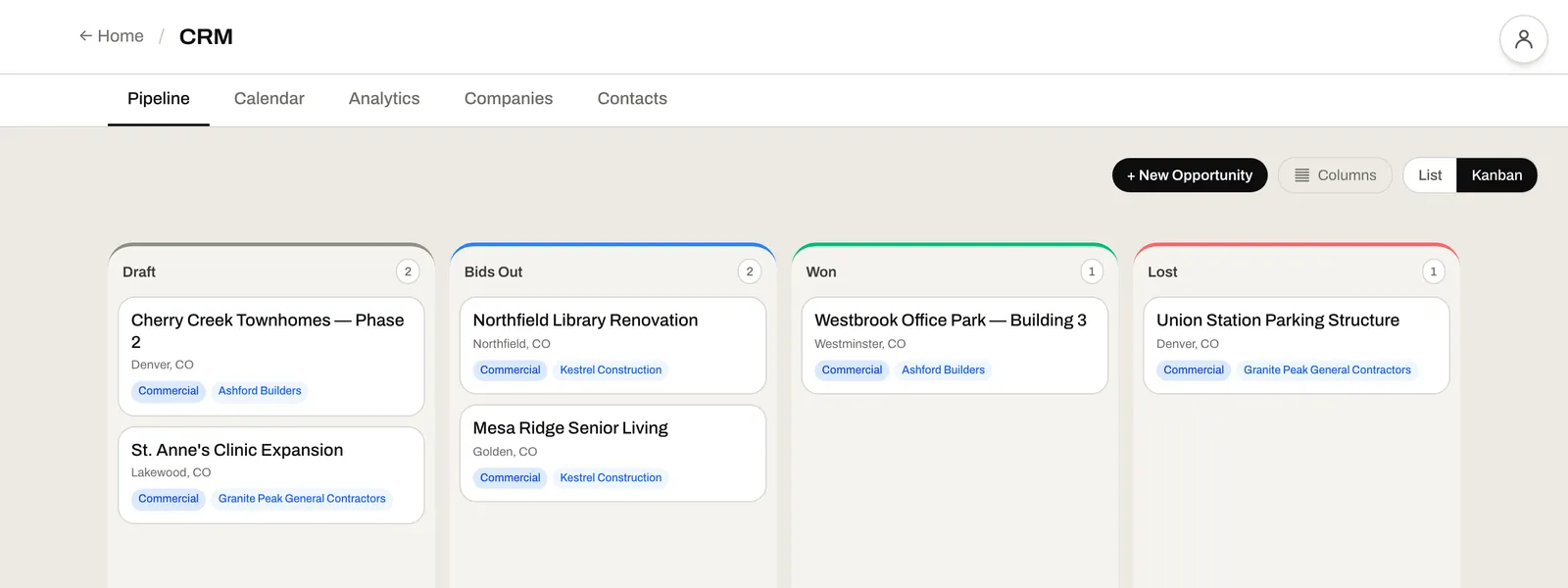
The bid board: draft, bids out, won and lost, with the general contractor on every card

A "CRM for construction" usually means a CRM for real estate that someone bolted construction labels onto.

Subs don't have a "sales pipeline" in the SaaS sense. They have a bid pipeline. Invites land in someone's inbox, you decide whether to bid, you submit, you win or lose, you adjust. Force that into a generic CRM and every workflow gets re-invented to fit somebody else's data model.

We built a CRM around the way GCs actually invite, the way you actually decide, and the way you actually track who you've worked with — and how it went.

Know what's due, what's out, and what you won.

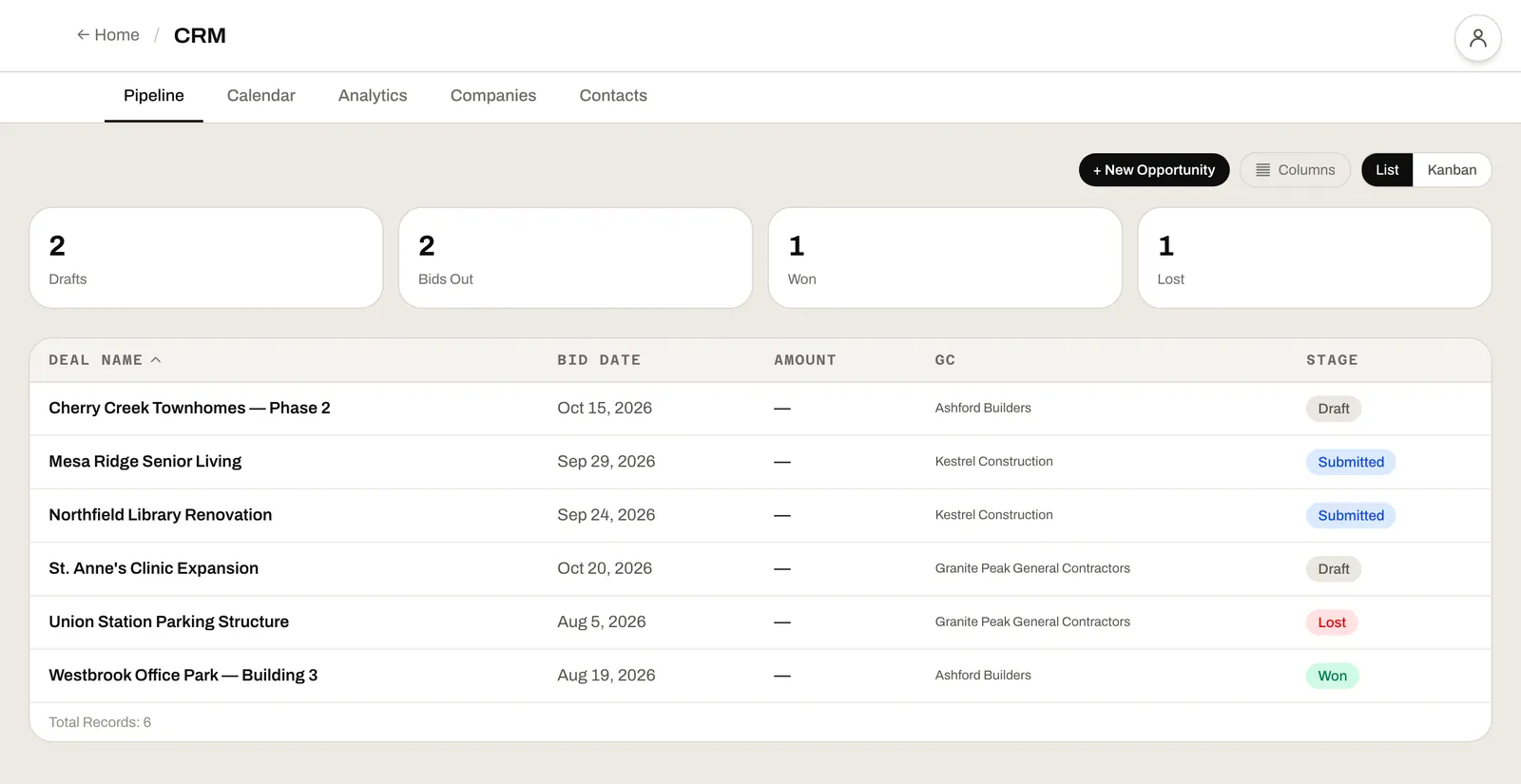
Every bid carries its stage, its bid date and the GC — sort the list by what's due next, or see the whole board at once. When one is won it becomes the job, with its estimate and budget, instead of another spreadsheet to start over.

  • The same bids as a list or a board
  • Sort by bid date, stage or GC
  • A won bid becomes the project — nothing re-typed
The bid pipeline as a list, sorted by deal name, with each bid's date, GC and stage

The bid pipeline in one screen.

Built around the bid invite — not around lead-gen forms, not around marketing funnels, not around sales reps with quotas. The workflows that match your day.

01

GCs, owners, architects

Companies and contacts categorized by role — the relationship map your business actually runs on. Not a generic "lead" table.

02

The pipeline BuildingConnected won't show you

Draft → qualified → submitted → won, lost, declined. Pipeline value by GC, by scope, by month. Win rate trending up or down. The view your bid manager actually needs before Monday's meeting.

03

Stop bidding the wrong work

Six criteria — capacity, capability, profitability, relationship, geographic, bonding. One decision threshold. The framework no other construction CRM ships with, and the single feature that pays for the system in the first quarter.

04

Win / loss reasons

Tag every lost bid: price, scope, relationship, capacity, no-bid, other. Quarterly reviews finally have data behind them.

05

Follow-up tasks

Tasks tied to companies, bids, or contacts. Nothing falls through the cracks because it lived only in someone's inbox.

06

Win-rate analytics that map to your work

Win rate by GC, by scope, by estimator, by zip code, by bid size. Spot the GCs you should be chasing harder — and the ones you should be politely declining. The opposite of bidding harder because the year is ending.

Every project starts as a card on the bid board.

A bid invite lands in the CRM as an opportunity. Go/no-go runs. If go, the estimate is built. Win the bid and the opportunity becomes the project — with everything you know about that GC, that architect, that scope already attached.

01Take-Off
02Estimating
03CRM
04Construction Mgmt
05Job Costing
06Field App
← From bid invites

Every invitation lands as an opportunity. Tied to the GC, the architect, the project address, the scope. Past relationships visible at a glance.

→ To Estimating

A go decision triggers the estimate. The CRM holds the bid context; the estimator builds the numbers. No re-keying.

→ To Construction Mgmt

Win the bid, the opportunity becomes a project. PMs inherit the GC contact, the bid scope, and the won estimate as the starting baseline.

Who actually uses it.

Role 01

Owners

Know your win rate, not just your win count. Spot the GCs that pay on time, the scopes that win consistently, the work you're losing money chasing.

Role 02

Senior Estimators

Manage the bid queue. Decide go/no-go on the work that's worth it. Stop chasing the work that isn't.

Role 03

Business Development

Track relationships across every GC and architect in your market. See the pipeline, not just the inbox.

Common questions.

Yes. We migrate your contacts during onboarding from CSV, Excel, or another CRM. Companies and contacts are categorized by role as part of the import.

Email parsing for BuildingConnected and similar platforms is an advanced feature we roll out by tier. Talk to us about your inbox volume and we'll walk through the fit.

Yes. Tasks can be tied to a company, a contact, or a specific bid card. The backlog view shows everything owed across the whole pipeline.

The CRM is where the estimate starts. A go decision pulls the bid context into a new estimate without re-keying — GC, scope, address, due date all flow through.

Won bids become projects. The CRM holds the relationship history so when that GC comes back with another invite, you've got their full bid history right in front of you.

See your pipeline on the bid board.

Start a free trial and try it on a live job, or book a 30-minute consultation and we'll walk through how your bid invites, your GC relationships, and your win-rate data would land in the CRM — using your active pipeline.